Piping isometric takeoff and data extraction

Turn piping isometrics into verified takeoff, fabrication and inspection data.

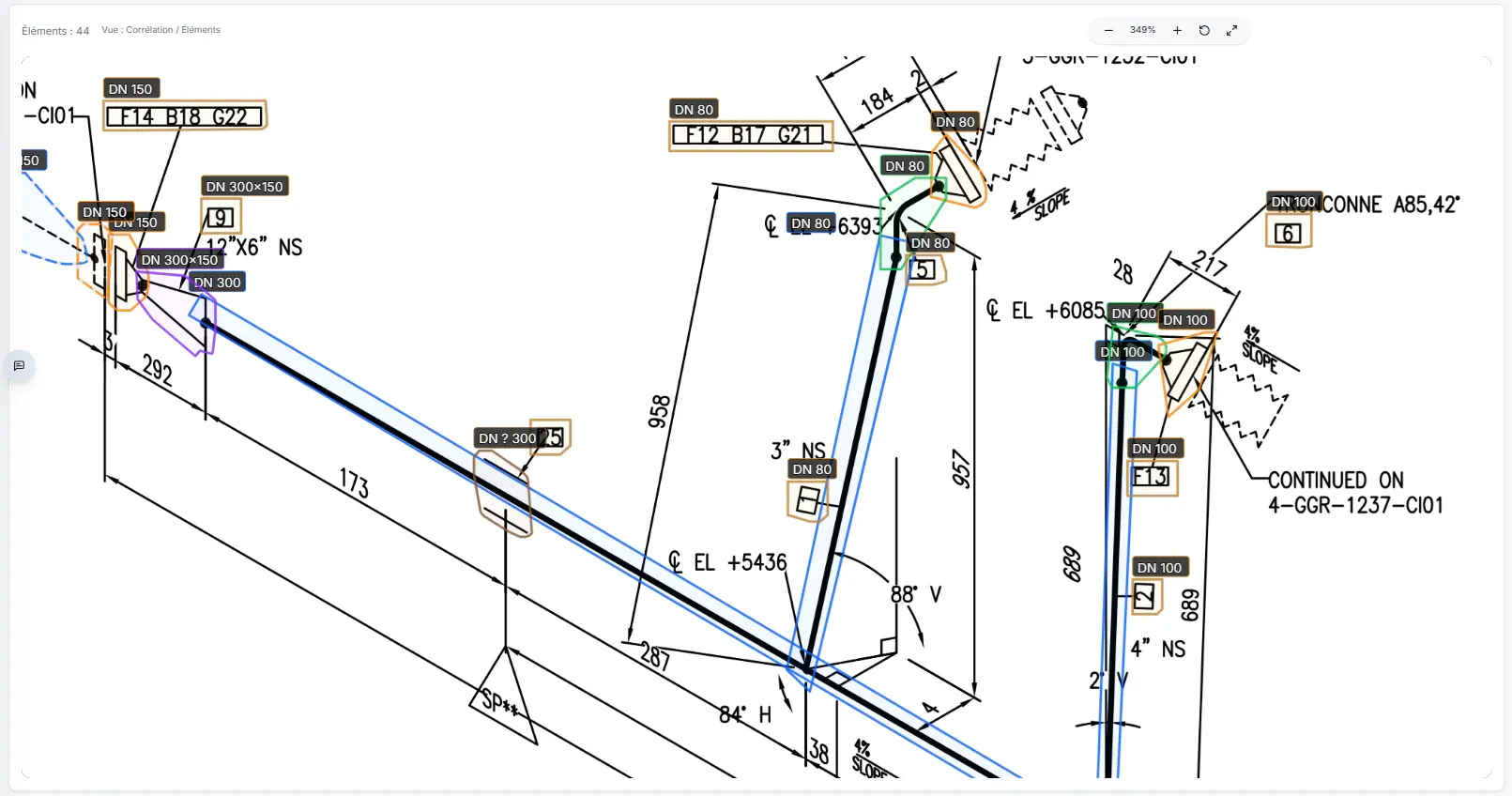
PipeVision reads PDF and DWG isometrics, detects piping components, matches them to BOM data, reconstructs the piping network and determines welds. Review every result on the drawing, then reuse the same data for estimating, fabrication, welding and inspection.
Isometric drawingWorkflow
Piping components detected and matched to BOM data
The same drawing, enriched at every stage

Where piping teams still lose time

The same welds, quantities and BOM data are still recounted from one system to the next.

Estimating, fabrication and inspection teams still recount welds, rebuild BOMs and re-enter information already present in the isometrics.

Estimate

  • Recount welds by DN, schedule and material
  • Rebuild the bill of materials from piping isometrics
  • Check a subcontractor’s quantities
  • Compare quotations and bills of quantities line by line

Prepare

  • Copy and paste data into Excel or internal tools
  • Add weld and fabrication tags to the isometric
  • Prepare fabrication deliverables

Inspect

  • Re-create inspection tags on the drawing
  • Re-enter the data into asset management or maintenance tools

PipeVision

From piping isometrics to takeoff, fabrication and inspection data.

PipeVision detects piping components, matches them to the BOM, reconstructs the piping network, determines welds and prepares the data needed for takeoff, fabrication, welding and inspection.

Explore PipeVision capabilities

01 — Detect

Detect piping components and match them to the BOM.

PipeVision detects pipe segments, elbows and other piping components, then matches them to BOM lines to assign DN, schedule and material.

Piping components detected on an isometric and matched to BOM data
Detected components matched to BOM linesEvery component stays traceable to its exact location on the ISO.

02 — Reconstruct

Reconstruct the piping network and determine welds.

Using drawing geometry and component properties, PipeVision reconstructs the piping network and determines the welds.

Reconstructed piping network with welds listed in PipeVision
From detected components to a connected piping networkEvery connection remains reviewable on the ISO and in the weld list.

03 — Estimate

Build the takeoff and labor estimate from weld data.

Determined welds feed diameter-inch calculations and reference labor units for shop and field work. The user remains responsible for validating the shop vs field classification.

PipeVision estimate view showing diameter-inches and shop and field labor units
Every total traceable to a weldResults remain traceable from totals down to the weld shown on the isometric drawing.

04 — Prepare

Prepare fabrication and weld data.

PipeVision generates editable weld numbering that users can reposition on the ISO. Once the shop vs field classification is validated, weld and BOM data can be used to prepare fabrication, maintain weld documentation and feed other systems.

Grouped PipeVision results with CSV and JSON export actions
Reviewed weld and material data ready for fabrication planningReview, group and export weld and BOM data as CSV or JSON.

05 — Inspect

Define the inspection scope.

PipeVision breaks the network into inspection items, including supports and the technical properties needed to monitor the line. Tags follow the convention defined with your team, and the resulting inspection register can be reviewed and exported.

Inspection tags and inspection register preview
Define the inspection scopePipe segments are split at supports, and every inspection item is tagged with its associated data.

Today → Tomorrow

The information already exists. Yet it is copied, lost and sometimes measured again.

The same information is still recounted, copied and checked across documents and systems that do not communicate.

Today

The same information, in several isolated copies.

Estimating — quantities recountedFabrication — weld tags recreatedWelding — weld data copied againInspection — inspection items rebuilt

At every handover, teams copy, check and enter the same information into a new deliverable or tool.

Tomorrow with Valltis

One reference drawing, reused data.

Isometric drawing and structured technical data
Components & BOMNetwork & weldsEstimating & fabricationWeld documentation & inspection

Components, welds and their properties are extracted, structured and then reused at every stage.

Information extracted and structured once. Reused at every stage.

PipeVision use cases

From piping isometrics to estimating, fabrication and inspection.

Every workflow reuses the same components, welds and properties, all linked to the drawing and reviewable by your teams.

Build the takeoff without manual recounting

Count piping components and welds, consolidate quantities and calculate diameter-inches.

Trace every quantity back to the ISO

Compare reported quantities with drawing-linked quantities and trace every discrepancy to its source.

Prepare fabrication deliverables

Review the shop vs field weld classification before preparing fabrication deliverables.

Define the inspection scope

Identify the pipe segments, piping components and supports to inspect, together with their technical properties.

Feed your existing systems

Group welds and the bill of materials, then export the available data as CSV or JSON.

Reviewable results

Every quantity traces back to the ISO.

PipeVision keeps automated results linked to the drawing and editable, so estimating, fabrication and inspection teams retain approval.

  1. 01

    Drawing-linked

    Every result remains traceable to its location on the ISO and reviewable in context.

  2. 02

    Available exports

    Welds and the bill of materials can be exported as CSV or JSON.

  3. 03

    Editable results

    Suggested data can be corrected and completed in its document context.

  4. 04

    Human validation

    Suggested data remains editable and must be validated by the user.

Let’s look at a real case

Let’s try it with one of your drawings.

A demonstration using your own documents is the best way to assess PipeVision.

Request a demo